Halaman

Pengikut

Minggu, 31 Maret 2013

English Traffic Lights

Traffic Lights Animation Led Arduino

In this project we will make traffic lights animation in England, not know is its setting same with traffic lights in Indoensia. For this project certain we use led with color red, yellow, and green. Now we are going to look for how resistance value will be used for each.

Look for resistance value for red led
According to Red Led 5mm diffused datasheet, its Forward Voltage (VF) is 2 Volt and maximum is 2,5 Volt. So red led safe to operate at voltage range 2 - 2,5 Volt. According to Red Led 5mm diffused datasheet its Forward Current (IF) is 20 mA. Output voltage from Arduino is 5 Volt

On series circuit like picture above, Voutput = VLed + VResistor.

If we use operating voltage 2 Volt for red led, then voltage for resistor (VResistor) is Voutput – VLed = (5 – 2) Volt = 3 Volt, forward current (IF) on red led is 20 mA, cause its circuit is series, certain current flows on resistor is also 20 mA, so that resistance value is needed is:


If we use operating voltage 2,5 Volt for red led...

read more...

Sabtu, 30 Maret 2013

Traffict LIghts

Animasi Lampu Lalulintas Led Arduino

Pada percobaan kali ini kita akan membuat animasi lampu lalu lintas di Inggris, gak tau apakah sama settingannya dengan lampu lalu lintas di Indonesia. Untuk percobaan ini tentu kita akan menggunakan lampu Led berwarna merah, kuning, dan hijau. Sekarang kita akan mencari dulu berapa nilai resistor yang akan dipakai untuk masing-masingnya.

Mencari nilai resistor untuk lampu Led merah
Menurut Red Led 5mm diffused datasheet, Forward Voltage (VF)nya adalah 2 Volt dan maksimalnya 2,5 Volt. Jadi Led merah aman beroperasi di rentang tegangan 2 – 2,5 Volt. Menurut Led 5mm diffused datasheet Forward Current (IF)nya adalah 20 mA. Tegangan output yang keluar dari Arduino adalah 5 Volt.

Pada rangkaian seri seperti gambar di atas, Voutput = VLed + VResistor.
Jika kita gunakan tegangan operasi 2 Volt untuk lampu Led merah...

baca selengkapnya...

Senin, 18 Maret 2013

turnonoff blink 10led arduino led

This article is continuation of previous article , on this article we need red led and 150 Ω resistor each as much as 10.


read more...

Sabtu, 16 Maret 2013

Menghidupmatikan berkedip 10led arduino pc

Artikel ini adalah merupakan kelanjutan dari artikel sebelumnya , pada artikel ini kita membutuhkan lampu LED merah dan resistor 150 Ω masing-masing sebanyak 10 buah


baca selengkapnya...

Senin, 04 Februari 2013

turnonoff blink led arduino PC

Turn on, turn off, and blink LED with Arduino board via computer/laptop/notebook/netbook/PC.

What are needed to turn LED on, turn LED off, and blink LED with Arduino? Exactly the first is Arduino board, then what else?

Breadboard
Red LED lamp
Resistor 150 Ω
Jumper Wires

Why do we use 150 Ω resistor?
Because we will string up components like this picture below:

Certain, what we want is LED on with maximal bright due to LED’s ability. More large current flow on LED, then more bright LED’s light, however very important to known that current range is allowed is 10 mA – 20 mA and range voltage is 1,6 V – 3,5 V due to its color character produced.

Voltage work/voltage drop on a LED due to color produced:
  1. Infrared : 1,6 Volt
  2. Red : 1,8 – 2 Volt
  3. Orange : 2,2 Volt
  4. Yellow : 2,4 Volt
  5. Green : 2,6 Volt
  6. Blue : 3 – 3,5 Volt
  7. White : 3 – 3,6 Volt
  8. Ultraviolet : 3,5 Volt

Acconrding to LED Red diffused 5mm datasheet, maximal VF (tegangan work) is 2 Volt, as while voltage is produced of PC USB is 5 Volt. According to Kirchoff Low about voltage at picture above:
VSumber = VLED + VResistor

If current flow more than 20 mA then LED will be burned. To keep LED is not burned, we need... READ MORE HERE

Senin, 21 Mei 2012

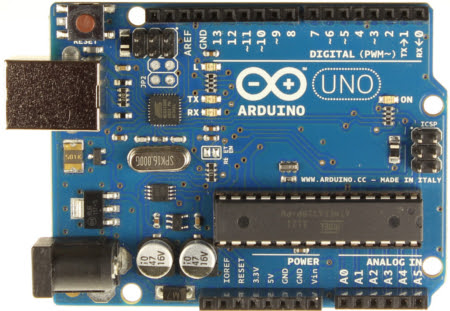
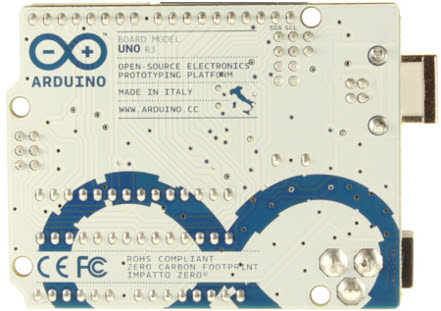
Mengenal Arduino UNO


Rabu, 09 Mei 2012

Jenis-jenis board Arduino


Bersumberkan dari http://arduino.cc/en/Main/Hardware, didapat jenis-jenis board Arduino adalah sebagai berikut:

Arduino UNO

Arduino Mega 2560

Arduino Mega ADK
bac selengkapnya...

Daftar Isi

asdkjfhkadsjfdsfdsfdsfjdsfk hdskjfh kdsjfhkjs adhfkjash dkjfh sadkjfh kadsjfh kjladshf kjladshf hdskjf hadskjhfkj ashdfkljh dsakjfh sdhfkl jadshfkjl hadskjf hkdsjlhf kjdshlkhkadshf kjhdsfjkhdskfj hkjdgshksdhgkjdshf kjhdsfkj hasdkjfh kjasdhf kjasdhfaskdjfh adsjghasdkjl asdfh s adsjh dsfh sdhkldshf hkasfh kladshf khsdkf hasdfkj hdsakhfkjldshf shdj fhsadk fjhkjdshf kjadshf dshaf kadshfk jhdsalfk hadslfh ldsjfh dskjfh kjdshf kjldshfkjl dshf klhsdklajhfdsk ajhfadskjhfdskajfh kjdsfhksjdfh kjash dfkjhdsk aljhfskadhf sjd

Followers

Buku tamu untuk sahabat


Copyright © 2009 by coretan sahabat